File transfers that feel like part of your Mac.

DockBird is a native SFTP, FTP, S3 and WebDAV client for macOS. Two panes, drag and drop, Quick Look and Finder’s shortcuts, in a 39 MB app that opens in a blink.

macOS 15 Sequoia or later · Apple silicon and Intel · Free 7-day trial, then one purchase

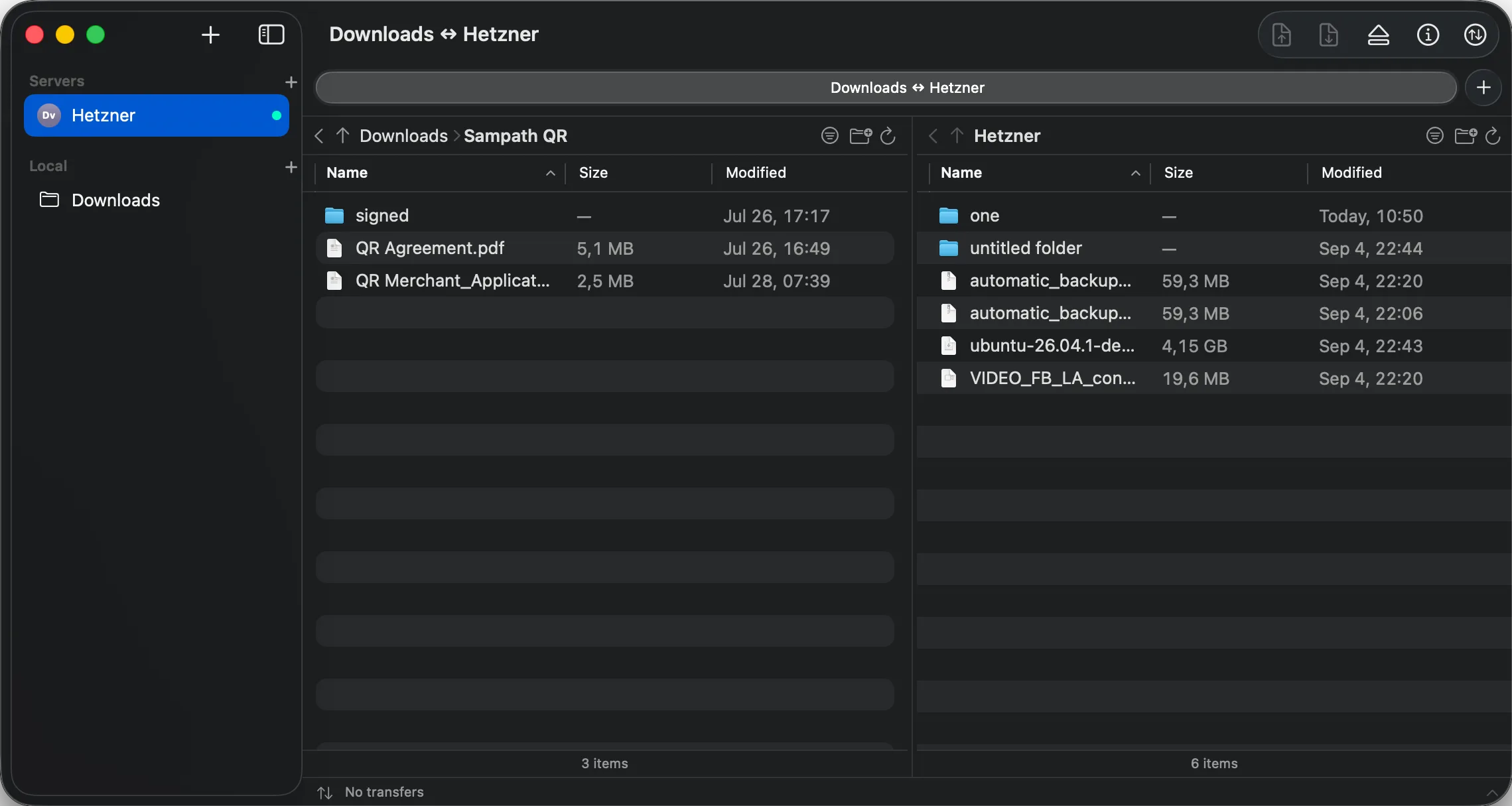
DockBird window with a local Downloads folder on the left and a remote server on the right, servers listed in the sidebar and a transfers bar at the bottom

Connect to the servers you already have.

One New Connection sheet covers SSH boxes, shared hosts, DAV shares and every S3-compatible bucket. Pick a tile and DockBird fills in the endpoint quirks for you.

Why DockBird

Native, not wrapped

Swift and SwiftUI, no Electron, no Java runtime, no helper daemons. It launches instantly, uses the system Keychain, and lives inside the App Sandbox like a Mac app should.

Two panes, one drag

Your folder on the left, the server on the right. Drag between them, or to and from Finder. Press Space to Quick Look a remote file before you bother downloading it.

Trust you can inspect

SSH host keys and TLS certificates are shown with their SHA-256 fingerprint before the first byte is sent, then remembered. The only thing DockBird reports back is that it launched and which protocol you used — never your servers, and never without a switch to stop it.

Everything Finder taught you still works here.

DockBird borrows the shortcuts, the columns and the manners of the file manager you already know, then adds what a server needs.

Browse servers like folders

Sort by name, size or date. Filter with ⌘F. Right-click a column header to show permissions, owner, group or storage class. Open Get Info to see where a file lives, copy an sftp:// or s3:// link, or flip permission bits and hit Apply.

Drops that land where you expect

Drop a folder and DockBird expands it into individual transfers before starting, so it can spot a file that already exists and ask once: Replace, Skip or Keep Both, for this file or all of them. A setting skips unchanged files entirely, and the destination pane refreshes itself when the batch finishes.

Know who you are talking to

The first connection to an SSH server shows its host key fingerprint, the way the ssh command does. FTPS and WebDAV servers with a self-signed certificate get the same treatment. Approved keys are remembered per host, and a change brings the prompt back instead of a silent connection.

S3 without the console

9 presets know the endpoint pattern, default region and addressing style for Amazon S3, Cloudflare R2, Backblaze B2, Wasabi, DigitalOcean, Hetzner, Scaleway, Linode and MinIO. Use access keys or a profile from ~/.aws, leave the bucket empty to browse them all, and let multipart handle the big objects.

A transfers panel that stays out of the way

The panel opens when a job starts and folds back into a one-line status bar a few seconds after the last one ends. A toolbar badge shows active and failed counts, and ⌥⌘T brings the full list back whenever you want it.

Your hands already know the shortcuts.

Menu commands act on whichever pane has keyboard focus, like Finder’s File menu.

  • ⌘NNew connection
  • ⌘TNew tab
  • ⌘OOpen local folder
  • ⇧⌘NNew folder
  • ⌘⌫Delete
  • Rename
  • ⌘IGet Info
  • SpaceQuick Look
  • ⌘↑Enclosing folder
  • ⌘↓Open selected folder
  • ⌘[Back
  • ⇧⌘GGo to folder
  • ⌘1 / ⌘2Focus local / remote pane
  • ⌘RRefresh
  • ⌘FFilter listing
  • ⇧⌘.Show hidden files
  • ⌥⌘TShow transfers

Light on your Mac.

DockBird ships as a 39 MB download. It runs sandboxed, keeps no background agents, and stores credentials only in the macOS Keychain. The two anonymous usage signals it sends are listed in full in the privacy policy, and switch off in Settings.

  • Written in Swift with SwiftUI and AppKit
  • App Sandbox and Hardened Runtime
  • Passwords and keys in the Keychain
  • Two anonymous signals, off with one switch
  • Universal build for Apple silicon and Intel

Frequently asked questions

Is DockBird free?

DockBird is a free download from the Mac App Store with a full-featured 7-day trial. After that a single one-time purchase unlocks it for good. There is no subscription and no account to create.

Which protocols does DockBird support?

SFTP, FTP, FTPS (explicit TLS), WebDAV and Nextcloud, plus Amazon S3 and every S3-compatible service: Cloudflare R2, Backblaze B2, Wasabi, DigitalOcean, Hetzner, Scaleway, Linode and MinIO, or any custom endpoint.

Which Macs does it run on?

Any Mac running macOS 15 Sequoia or later, on Apple silicon or Intel. The download is about 39 MB.

Where are my passwords stored?

In the macOS Keychain, the same place Safari keeps yours. Connection details without secrets are saved in a small JSON file inside the app’s sandbox. DockBird never sends credentials anywhere except to the server you are connecting to.

Does DockBird collect analytics?

Two anonymous signals: that the app started, and which protocol a connection used. Never your servers, usernames, files or paths. They go to TelemetryDeck in the EU, which stores no IP addresses, and you can switch them off in Settings → Privacy — the app asks you the first time it runs. There is no crash reporter and no advertising SDK. See the privacy policy for the exact list.

How is it different from Transmit or Cyberduck?

DockBird is a smaller, newer app that focuses on a two-pane, drag-and-drop workflow with Finder’s shortcuts and a strict native, sandboxed build. See the comparison pages for the details.

Ready to move some files?

Download DockBird, connect to a server, and try every feature free for 7 days.

macOS 15 Sequoia or later. Apple silicon and Intel.